 Formlore
Turn a furniture assembly manual into a 3D guide
Give your AI an existing furniture assembly manual, review the interactive 3D draft in Formlore, then share it with customers by link or QR code.
1. Give your AI the assembly manual
On a computer, create a product in Formlore. Copy its prompt into an AI that can read images and make authorized HTTP requests. Attach the PDF, product photos and parts list in that AI conversation. Include known dimensions and close-ups of any mounting details the manual leaves unclear.
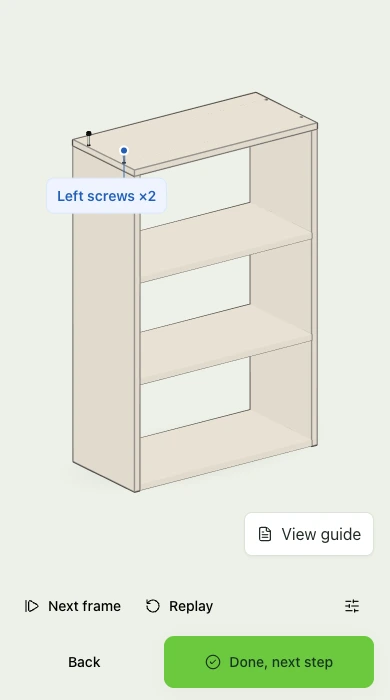
Take step 5 of the built-in shelf example. The instruction is to line up four screws with the holes in the top panel, then tighten them into both side panels with a Phillips screwdriver.
2. Check the 3D draft against the product
Ask your AI to build the guide from the manual. It sends the parts, connections and steps to Formlore. Open the saved draft in the preview. In the shelf guide, the top panel is already in place. Two screws come down through the top into the left side panel, followed by the pair on the right.
- Match the four screws and their holes to the manual and hardware. Check which face is up and where each screw enters.
- Replay the step from another angle. Check that the top is seated before the screws move and that each pair goes into the correct side panel.
- If a hole, fastener or installation detail is unclear, confirm it against the product before approving the draft. Ask your AI to correct the guide and check the revised preview.
3. Publish and test the QR code
Publish the draft you have reviewed, then download its QR code or copy the customer link. Scan the code on a phone to check that it opens the right guide. When you publish a revised guide, the printed code opens the latest published version. Draft edits stay private until you publish them.
4. Open the guide as a customer
The code opens the guide in the phone’s browser without an account or app install. Customers can rotate the finished shelf and tap View guide to check the materials and tools. Once they start assembly, they can replay a movement and advance when they have finished that step.
The six-step shelf demo uses the same viewer as a published guide. Try it on your phone and advance to step 5 to see both screw pairs in motion.
Cost
Creating, publishing and viewing in Formlore are free. Your AI provider may charge separately.